How to Set Up Alerts & Notifications

Never miss a spike, crisis, or trending topic. Set up real-time alerts to keep your team informed.
Understanding Alerts
🔔
What are Affogata Alerts?
Alerts notify you when something unusual happens in your data — like a spike in critical bug reports or a sudden drop in sentiment. They trigger based on volume thresholds (e.g., 30 mentions in 1 hour) and are sent via email to anyone on your team, even people without an Affogata account.
📊
What kinds of issues can I monitor with alerts?
You can set up alerts for anything that matters to your team. Common examples: P0 – Critical issues like server outages or IAP failures, P1 – Gameplay bugs like event delays or scoring issues, P2 – Functional problems like pricing glitches or UI issues, P3 – Community mentions like minor lag or visual bugs. Each level can have its own alert with different thresholds and recipients.
Setting Up Alerts Step by Step
🔍
Step 1 — Build a good search first
Before creating an alert, you need a solid search to attach it to. Start from a broad topic (e.g., "Technical Issues") and refine it:

Include keyword variations: can't buy, cannot buy, cant buy — and synonyms or common misspellings.
Exclude false positives — words that sometimes appear in a positive context (e.g., "glitch" used as a compliment).
Remove noisy sources if they're not relevant (e.g., YouTube or Steam if your team doesn't monitor those).
Validate the volume by checking how many mentions this search returns over the past 30 days — this helps you set the right threshold later.
💡 Tip: Save it as a Team Search with a clear name like Stumble_Alerts_P0_Critical so your whole team can find it easily.
🎯
Step 2 — Create the alert
Go to your search, click the Alerts icon (bell) in the toolbar, and click "Create New Alert". Fill in:

Name: Use a consistent format — e.g., P0 – Critical Tech Issues
Description: Explain what it covers and when it fires — e.g., "Notifies stakeholders of game-breaking issues. Triggered when 30+ mentions occur within 1 hour."
Threshold: Start high (e.g., 100) and lower it gradually after testing. Avoid intervals shorter than 1 hour unless strictly needed.
Recipients: Add emails separated by commas with no spaces — email1@domain.com,email2@domain.com. No Affogata account needed.
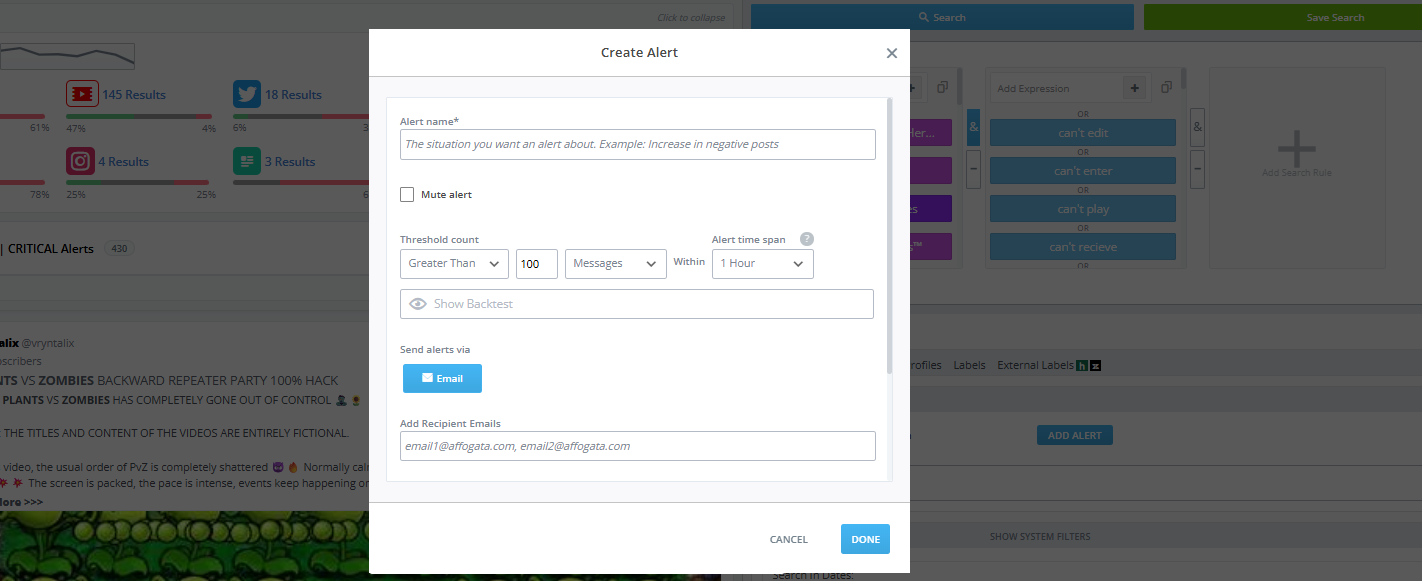
Create Alert fields
The Create Alert panel — fill in the name, description, threshold, and recipients.
💡 For Slack: Ask your team to set up a dedicated Slack channel and use Slack's "Send emails to this channel" integration to route alert emails directly there.
📋
Should I create multiple alerts?
Yes — one alert per severity level works well. Here's a simple starting structure:

Level Description Examples
P0Critical system-wide issuesServer outages, IAP failures
P1Important gameplay bugsEvent delays, scoring issues
P2Medium-priority functional issuesPricing glitches, UI problems
P3Minor issues or community mentionsMinor lag, visual bugs

Each alert can have different recipients and thresholds. P0 might go to your whole leadership team; P3 might just go to your community manager.
Best Practices
⚙️
How do I set the right threshold?
Start with a high threshold (e.g., 100 mentions in 1 hour) and lower it gradually while testing. Check your historical data — if your search usually gets 50 mentions a day, a threshold of 30 in an hour signals something real. Too many alerts coming in? Raise the number. Not hearing anything? Lower it. Avoid intervals shorter than 1 hour to reduce noise.
🎯
Can I set alerts for specific platforms only?
Yes! Filter your search to the platforms that matter (e.g., only Discord or only Steam reviews) and attach the alert to that filtered search. This keeps alerts focused and avoids noise from channels your team doesn't actively monitor.
🔧
How do I edit or disable an alert?
Go to your search and click the Alerts icon — you'll see all active alerts listed there. Click any alert to update the threshold, recipients, or name. Toggle the switch to pause it without deleting it. You can re-enable it anytime, which is handy before a game launch or live event.
Troubleshooting
Why am I not receiving alerts?
A few things to check: (a) Make sure the alert is toggled ON, (b) Confirm your email is in the recipients list — no spaces between addresses, (c) Check your spam or junk folder, (d) The threshold might be set too high — lower it and test. If everything looks right and alerts still aren't coming through, reach out in your Slack support channel.
7